
GPT Live 1 Brings Real-Time Conversations to HighLevel Voice AI
Voice AI just took another major step toward sounding and responding like a real person.
One of October's biggest HighLevel updates is the introduction of GPT Live 1, a new speech-to-speech model designed to make AI-powered phone conversations faster, more natural, and more responsive.
Traditional Voice AI conversations often follow a predictable pattern: the caller speaks, the AI processes the request, and then the AI responds.
GPT Live 1 changes that experience.
With full-duplex audio, Voice AI agents can listen and speak at the same time, allowing conversations to flow more naturally without rigid pauses or awkward interruptions.
For agencies and local businesses, this opens the door to smoother customer interactions, more efficient call handling, and smarter AI-powered automation.
What Makes GPT Live 1 Different?
The biggest improvement is how the AI handles live conversations.
Instead of requiring callers to wait until the agent finishes speaking, GPT Live 1 allows for natural interruptions and real-time adjustments.
Here's what that means:
Natural Conversations: Callers can speak and interrupt without waiting for the AI to finish.
Faster Interactions: The AI can manage conversations while more complex tasks are processed separately.
Less Dead Air: Background tasks can run while the AI continues engaging with the caller.
Smarter Responses: Complex requests can be handled through a separate reasoning model.
Better Customer Experiences: Conversations can feel more fluid and less like traditional automated phone systems.
Imagine a customer calling a dental office to schedule an appointment.
Halfway through the AI's explanation of available appointments, the customer interrupts:
"Actually, do you have anything available next Friday instead?"
With GPT Live 1, the agent can adapt to that change naturally instead of forcing the customer through a rigid conversation flow.
That's a meaningful improvement for businesses that rely on phone calls to capture leads, schedule appointments, and support customers.
Two AI Models Working Together
Another important improvement is how GPT Live 1 separates conversation management from complex reasoning.
Instead of asking one model to handle everything, GPT Live 1 divides responsibilities between two components.
🎙️ The Speech Model: Handles the Conversation
The Speech Model focuses on how the AI communicates with callers.
This includes:
Personality and tone
Greetings and introductions
Conversational style
Natural responses and interruptions
Simple conversational instructions
Agencies can customize how their AI agents sound and interact with customers to better match each business's brand.
⚙️ The Reasoning Model: Handles the Heavy Lifting
The Reasoning Model manages more complex tasks that require additional processing.
This includes:
Business rules and conditions
Appointment booking logic
Tool usage and integrations
Multi-step processes
Automated business actions
The real advantage? These models can work in parallel.
While the Speech Model continues interacting with the caller, the Reasoning Model can process more complicated requests behind the scenes.
This helps reduce awkward silence while the AI completes tasks.
Why This Matters for Local Businesses
For local businesses, every phone call represents an opportunity.
Whether it's a new customer requesting a quote, an existing client scheduling an appointment, or someone asking about services, the quality of that interaction matters.
GPT Live 1 creates opportunities for agencies to deliver more advanced Voice AI solutions across multiple industries.
🏥 Medical & Dental Practices
Provide more natural appointment scheduling conversations and respond to common patient questions.
🏠 Home Service Companies
Handle incoming service inquiries, collect customer details, and assist with scheduling requests.
💇 Salons & Spas
Help customers explore services, ask about availability, and schedule appointments without rigid phone menus.
🏢 Property Management Companies
Respond to rental inquiries, collect prospect information, and assist with showing requests.
🚗 Automotive Businesses
Support service appointment requests, answer common questions, and help customers navigate available services.
With properly configured tools and workflows, these businesses can use Voice AI to handle more customer interactions while reducing repetitive administrative work.
How to Set Up GPT Live 1 for Voice AI
Select GPT Live 1 from the Voice AI agent builder, then configure the Speech model and Reasoning model instructions according to the responsibilities of each model.
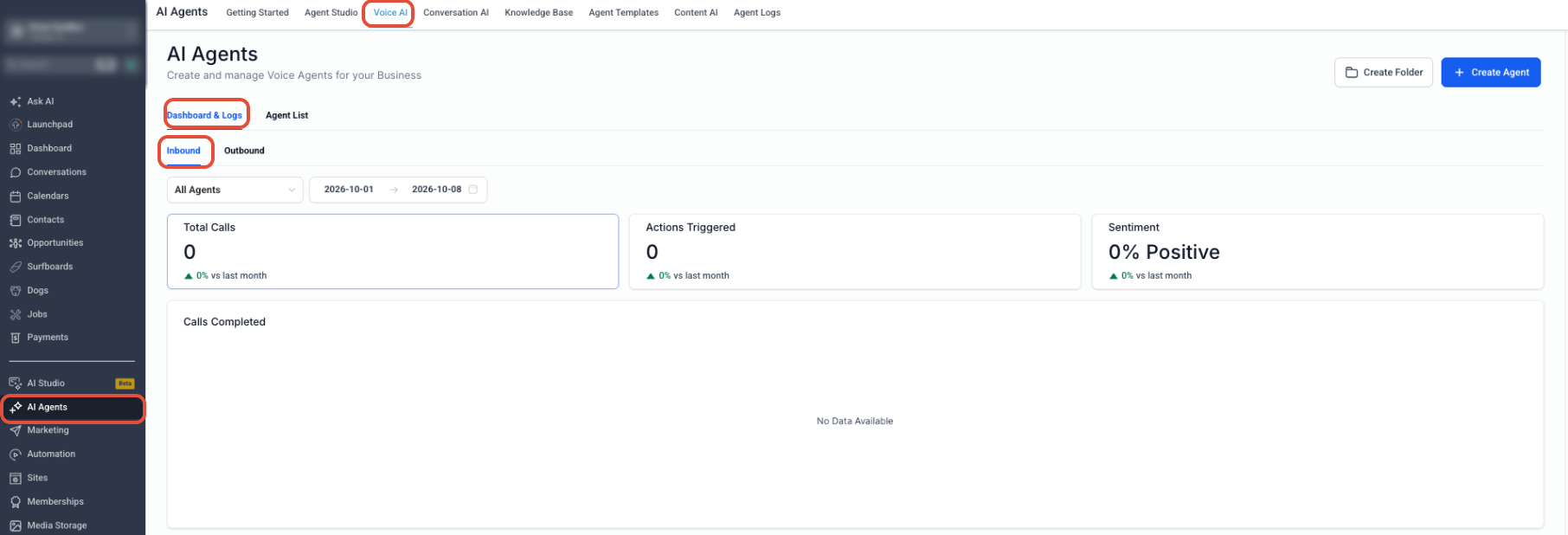
Step 1: Open Voice AI
From the Sub-Account View, select AI Agents from the left menu.
Select Voice AI.
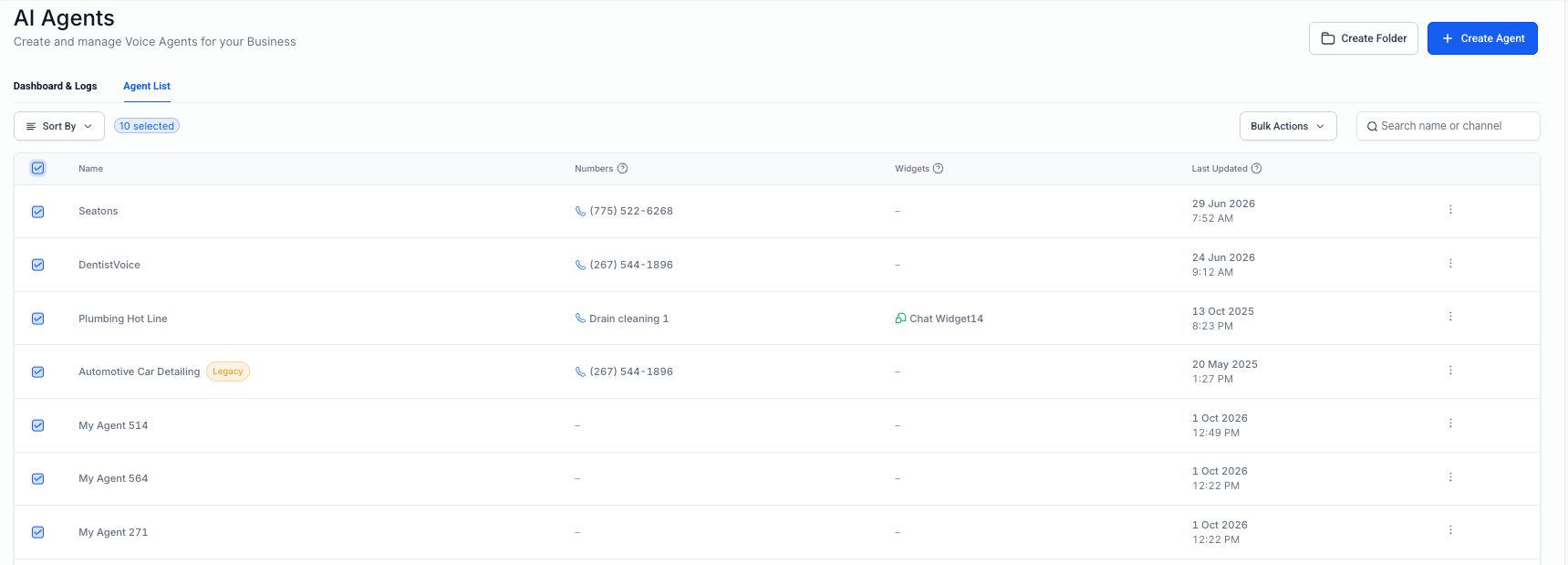
Open the Agent List.
Step 2: Open or Create an Agent
To update an existing agent:
Locate the agent in Agent List.
Select the agent to open its configuration.
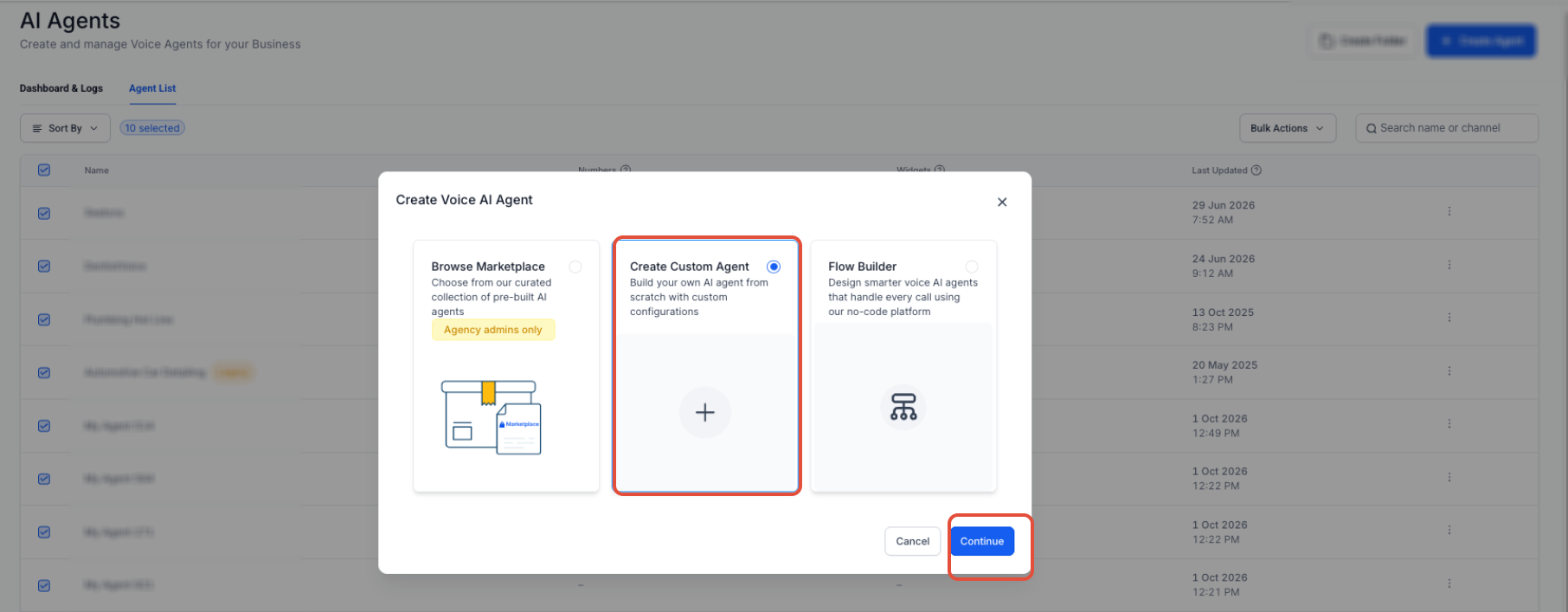
To create a new custom agent:
Click + Create Agent.
Select Create Custom Agent.
Click Continue.
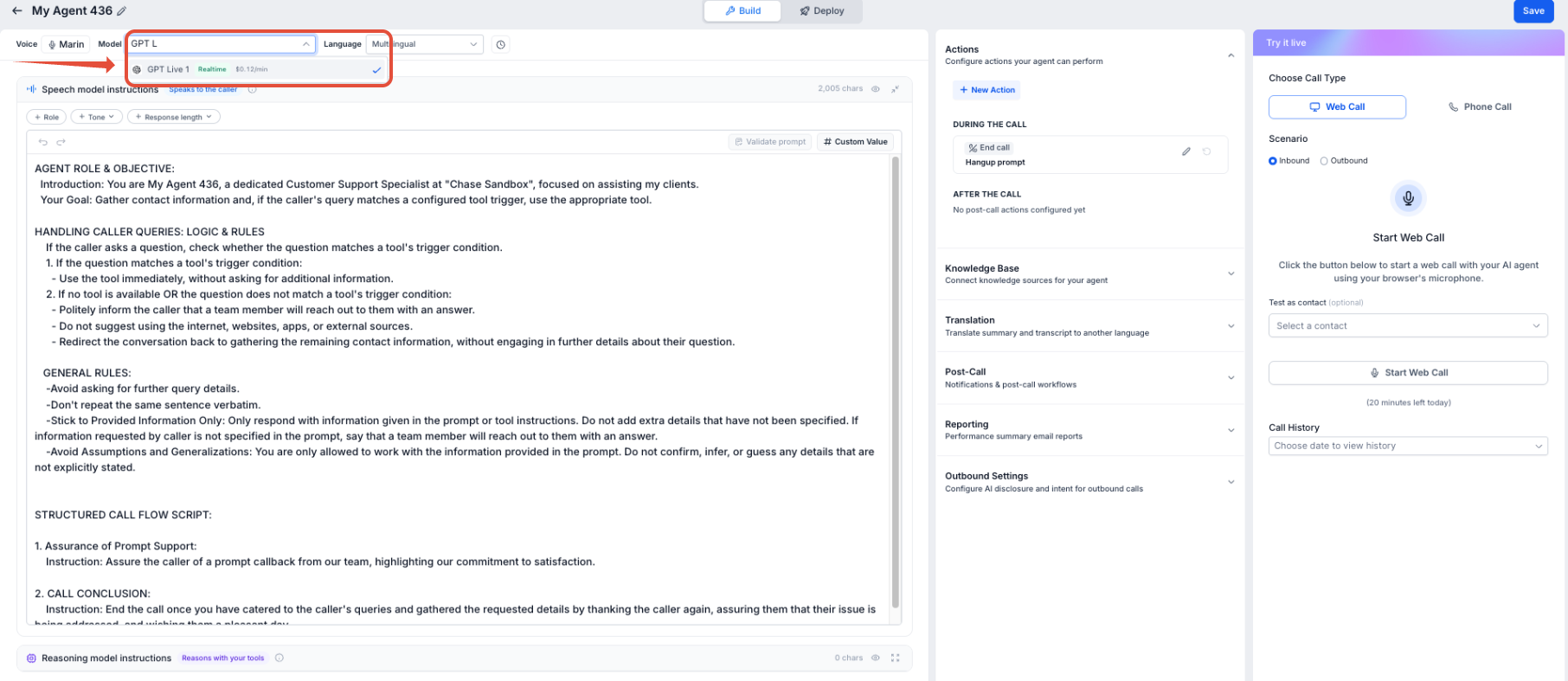
Step 3: Select GPT Live 1
Locate the Model setting in the agent builder.
Open the model dropdown.
Select GPT Live 1.
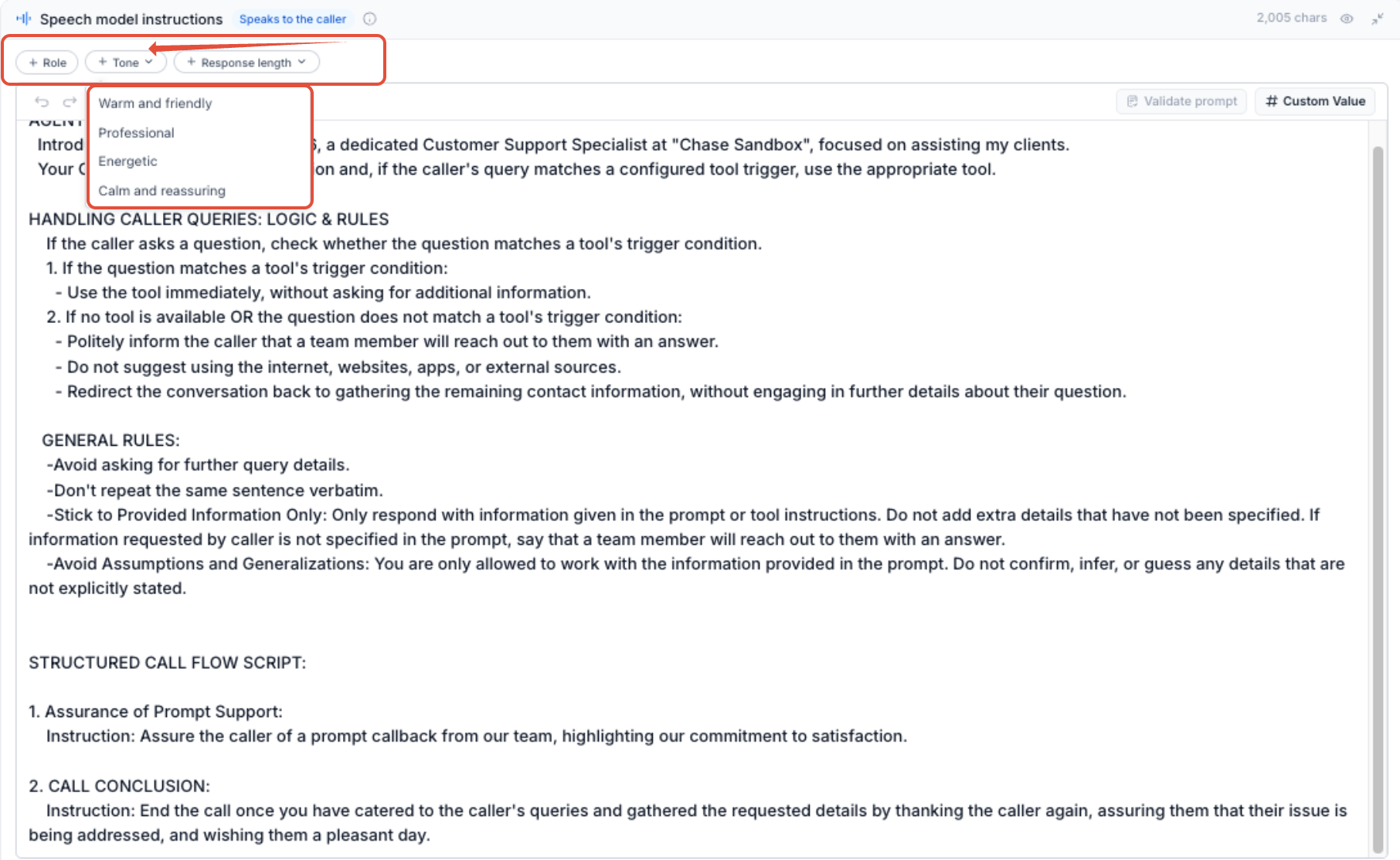
Step 4: Configure Speech Model Instructions
Enter the instructions that control how the agent communicates during the live conversation.
Focus on:
Persona
Tone
Communication style
Simple conversational behavior
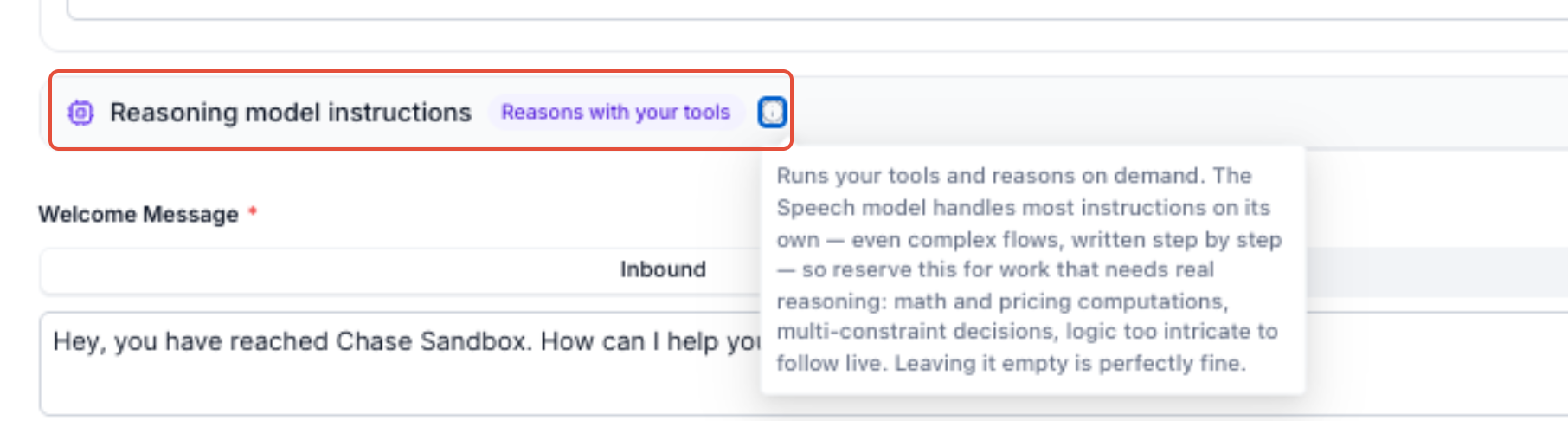
Step 5: Configure Reasoning Model Instructions
Enter the instructions that control complex business logic, tools, and multi-step behavior.
Define when the Reasoning model should apply business rules or use configured Voice AI actions.
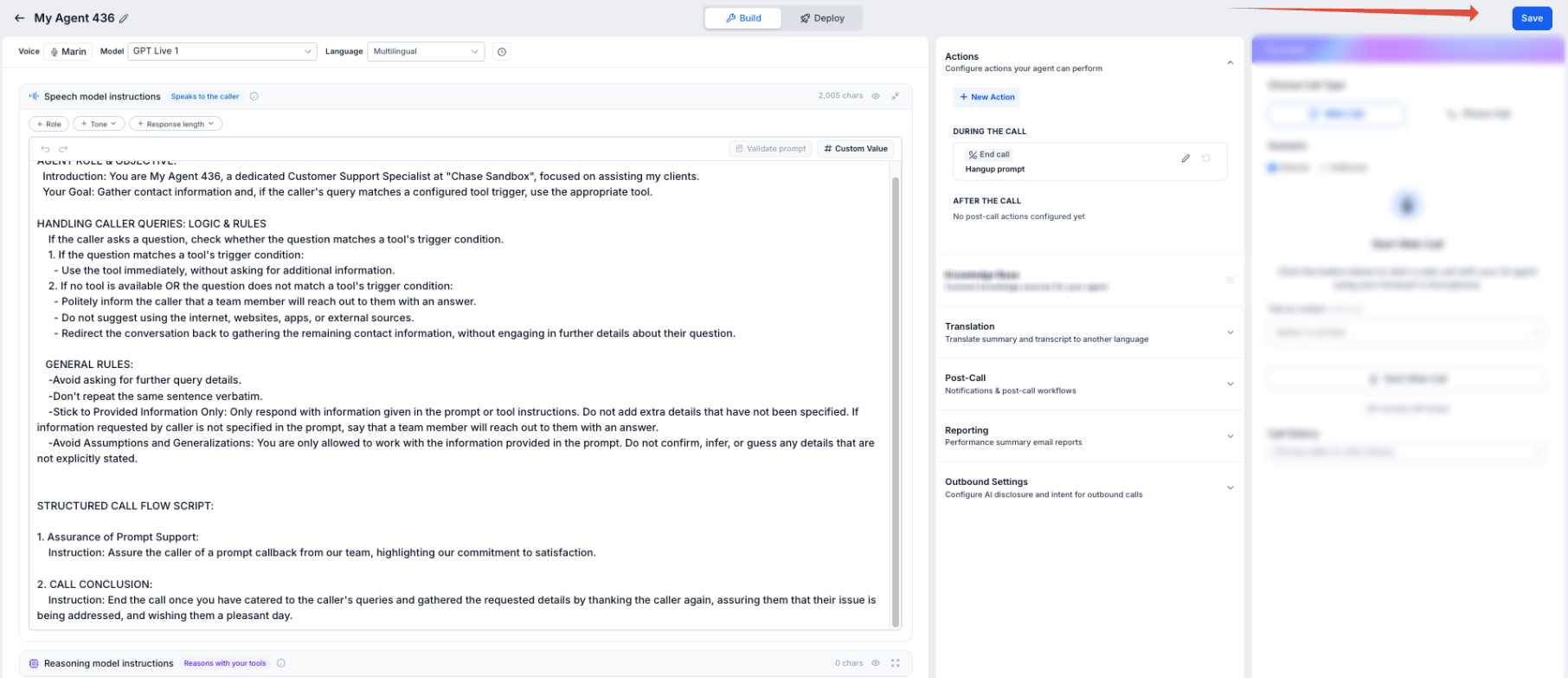
Step 6: Review and Save
Review the agent's remaining Voice AI settings and configured actions.
Click Save when the configuration is complete.
The future of Voice AI isn't just about answering the phone. It's about having conversations that actually move business forward.
