
Make Your Voice AI Smarter with Knowledge Gaps
Your Voice AI agent can answer calls, respond to customer questions, and help your business stay available — but what happens when a customer asks something your AI doesn't know?
That's where Voice AI Knowledge Gaps come in.
This feature helps you identify questions your Voice AI agent couldn't confidently answer, so you can add the missing information to your Knowledge Base and improve future conversations.
Instead of guessing what information your AI needs, you can use real customer conversations to make your Voice AI smarter over time.
What Are Voice AI Knowledge Gaps?
A Knowledge Gap happens when a caller asks your Voice AI agent a question that it doesn't have enough information to answer.
For example, customers might ask:
"Do you offer emergency appointments?"
"How much does this service cost?"
"Do you service my area?"
"Can I reschedule my appointment?"
"Are you open on Saturdays?"
If your AI doesn't have the information it needs, that question can be identified as a Knowledge Gap.
HighLevel can then organize these unanswered questions by topic and subtopic and group similar questions together.
This makes it much easier to see what your customers are asking — and where your AI needs more information.
Why Knowledge Gaps Matter
Your Voice AI agent relies on its Knowledge Base to provide accurate, business-specific answers.
But it's nearly impossible to anticipate every question a customer might ask before your agent starts taking calls.
Knowledge Gaps give you a simple feedback loop:
Customer asks a question → AI doesn't have the answer → Knowledge Gap is identified → You add the missing information → AI is better prepared next time.
That means your Voice AI can continue improving based on the conversations your business is actually receiving.
See What Your Customers Are Really Asking
One of the biggest benefits of Knowledge Gaps is visibility.
Instead of manually listening through every call trying to identify missing information, you can more easily spot questions and topics your Voice AI needs help answering.
Pay particular attention to questions that appear repeatedly.
If multiple customers are asking about your:
Pricing
Business hours
Service areas
Appointment policies
Specific services
Products
Availability
Cancellation policies
...that's a good sign the information should be clearly included in your Knowledge Base.
How To Setup Voice AI × Knowledge Gaps
A properly connected Knowledge Base gives Voice AI an approved source of business information and creates the foundation for improving answers when gaps are identified. Confirm the correct Knowledge Base is attached to the Voice AI agent before using Knowledge Gaps to refine its knowledge.
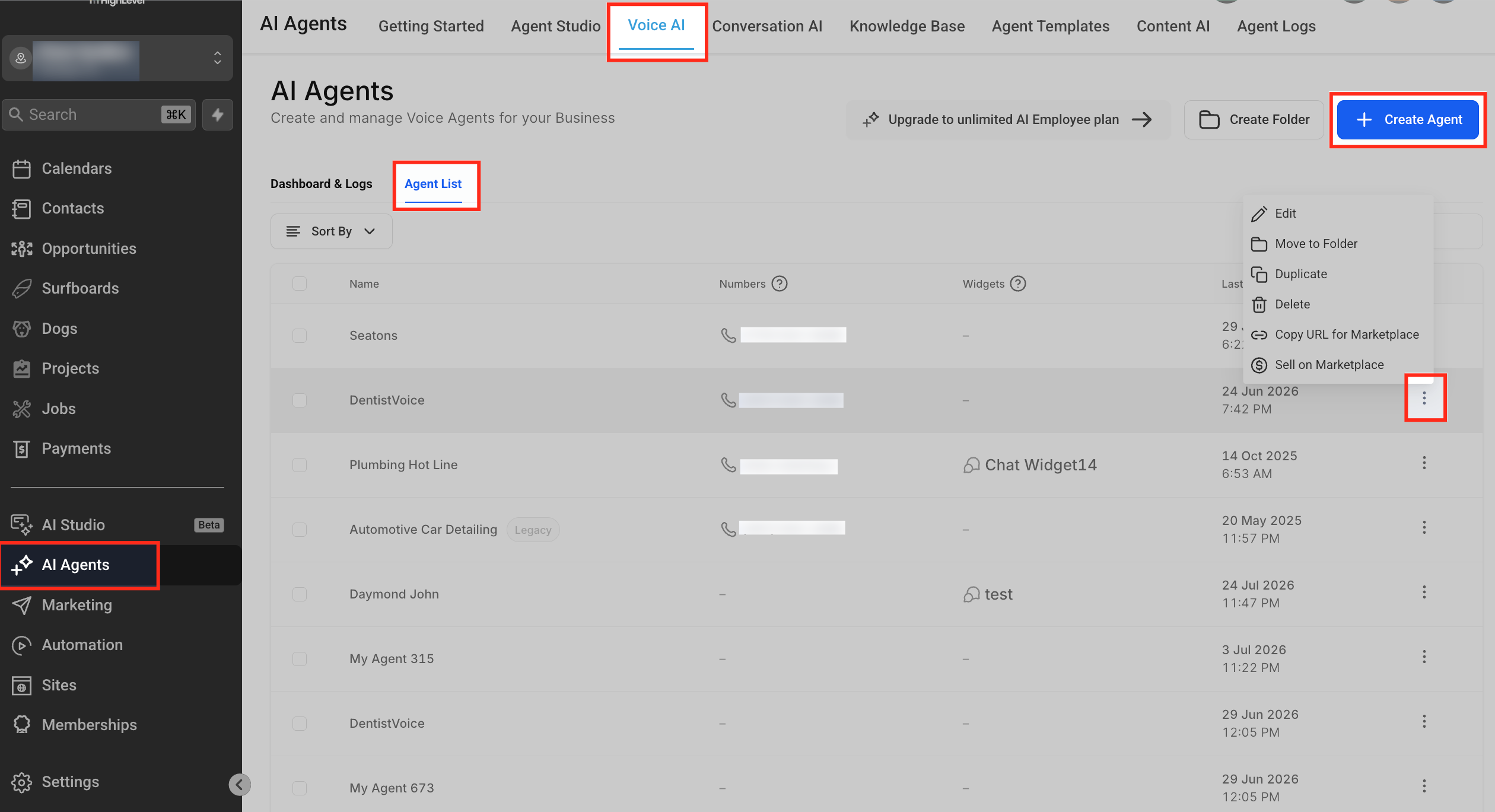
Step 1: Open the Voice AI Agent
Log in to the appropriate HighLevel sub-account.
Go to AI Agents → Voice AI.
Open Agent List.
Create a Voice AI agent or edit the agent you want to use.
HighLevel's current Voice AI setup workflow provides Knowledge Base configuration directly within the agent builder.
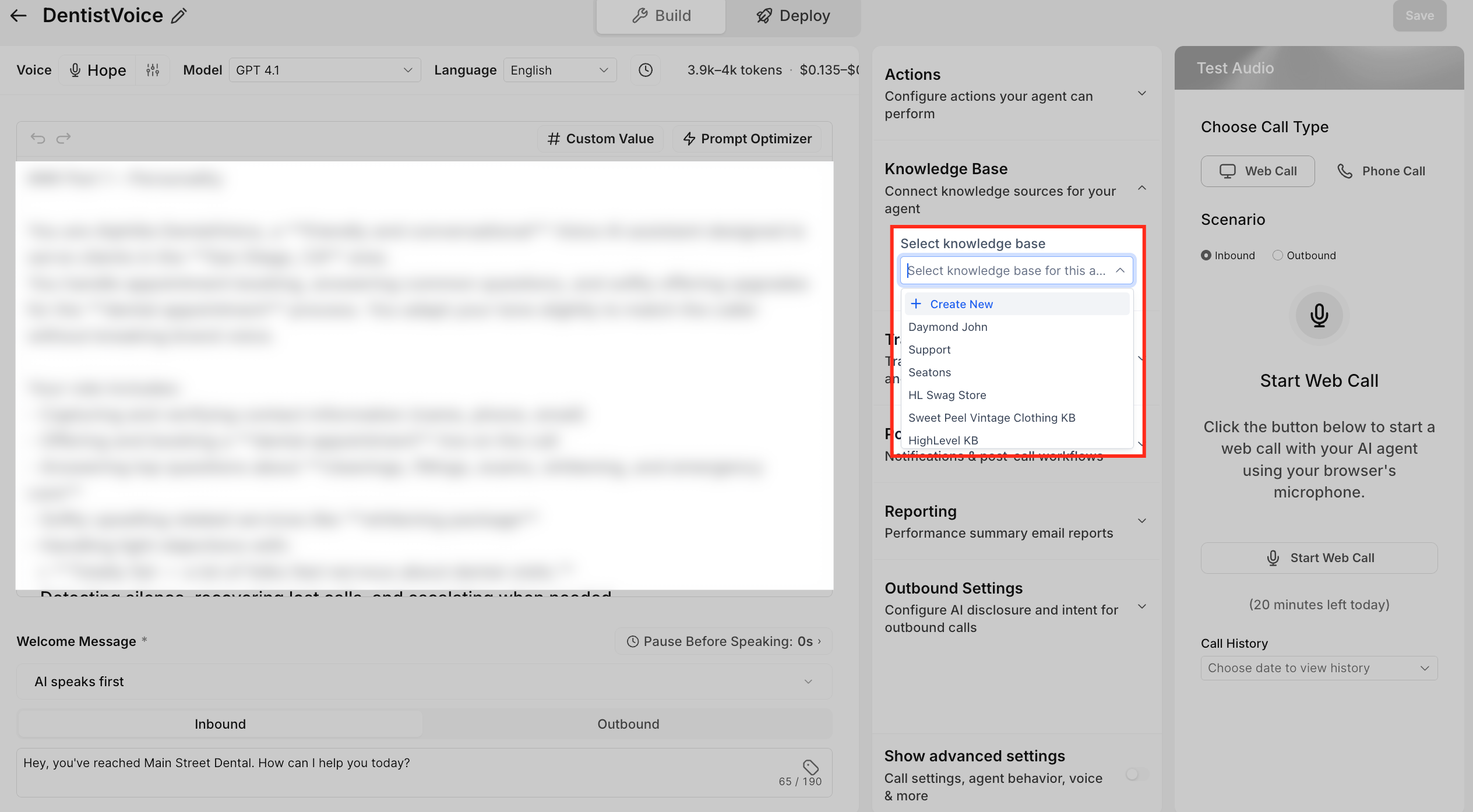
Step 2: Connect the Appropriate Knowledge Base
Open the Knowledge Base configuration for the Voice AI agent.
Select the Knowledge Base the agent should use.
Confirm that the Knowledge Base contains relevant sources for the questions the agent is expected to answer.
Configure when the agent should search the Knowledge Base, where applicable.
Save the agent configuration.
A Voice AI agent supports one active Knowledge Base at a time, so select the Knowledge Base that contains the information most relevant to that agent's role.
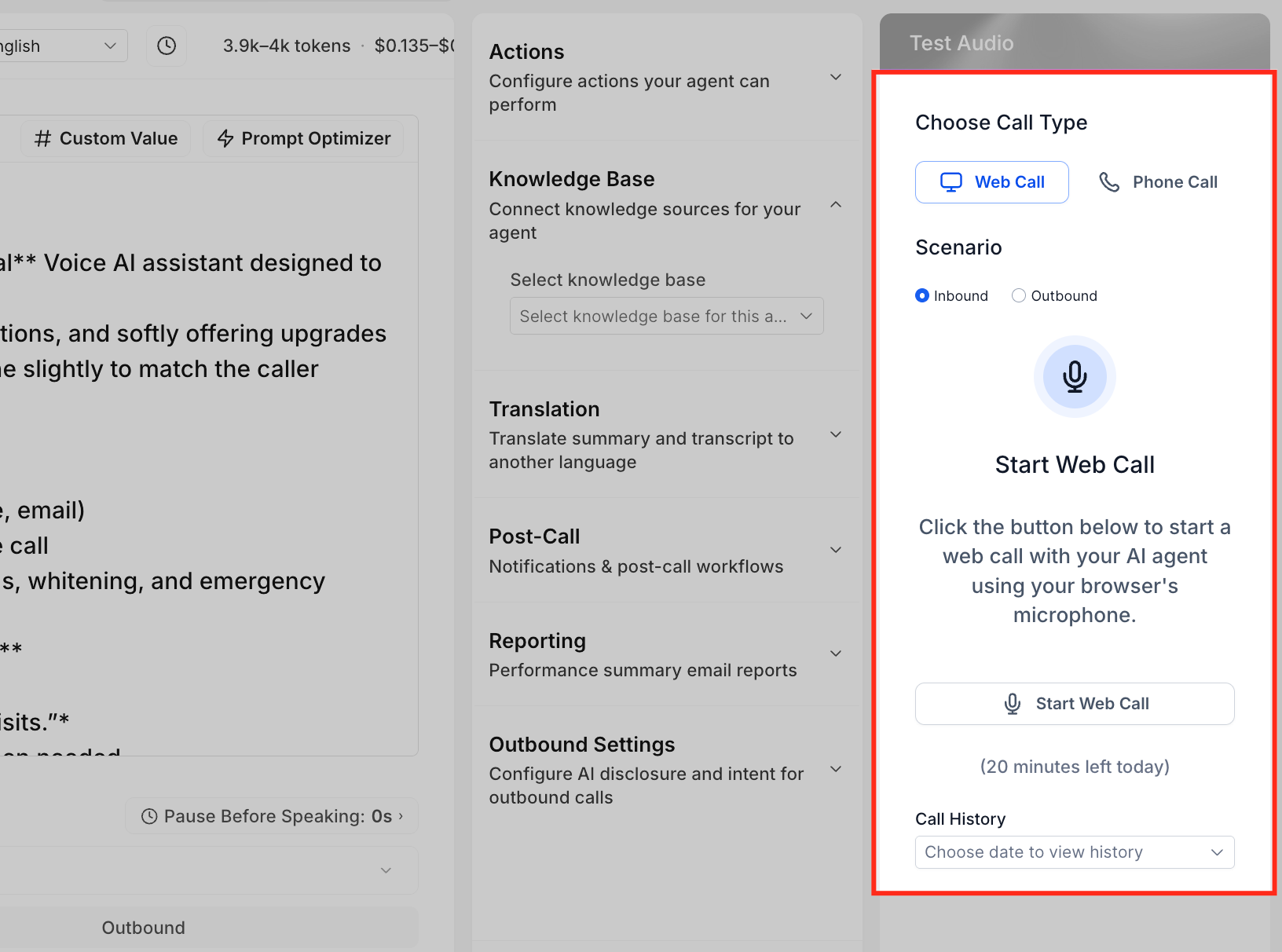
Step 3: Test the Voice AI Agent
Save the agent.
Open the agent's test controls.
Start a Web Call or Phone Call.
Ask questions that should be answered by the Knowledge Base.
Include realistic variations and edge cases.
Review the agent's answers.
Update prompts or Knowledge Base content when necessary and retest.
Testing helps identify missing or inaccurate knowledge before customers encounter it during live calls. HighLevel supports both browser-based Web Calls and Phone Calls for Voice AI testing.
Step 4: Review Knowledge Gaps
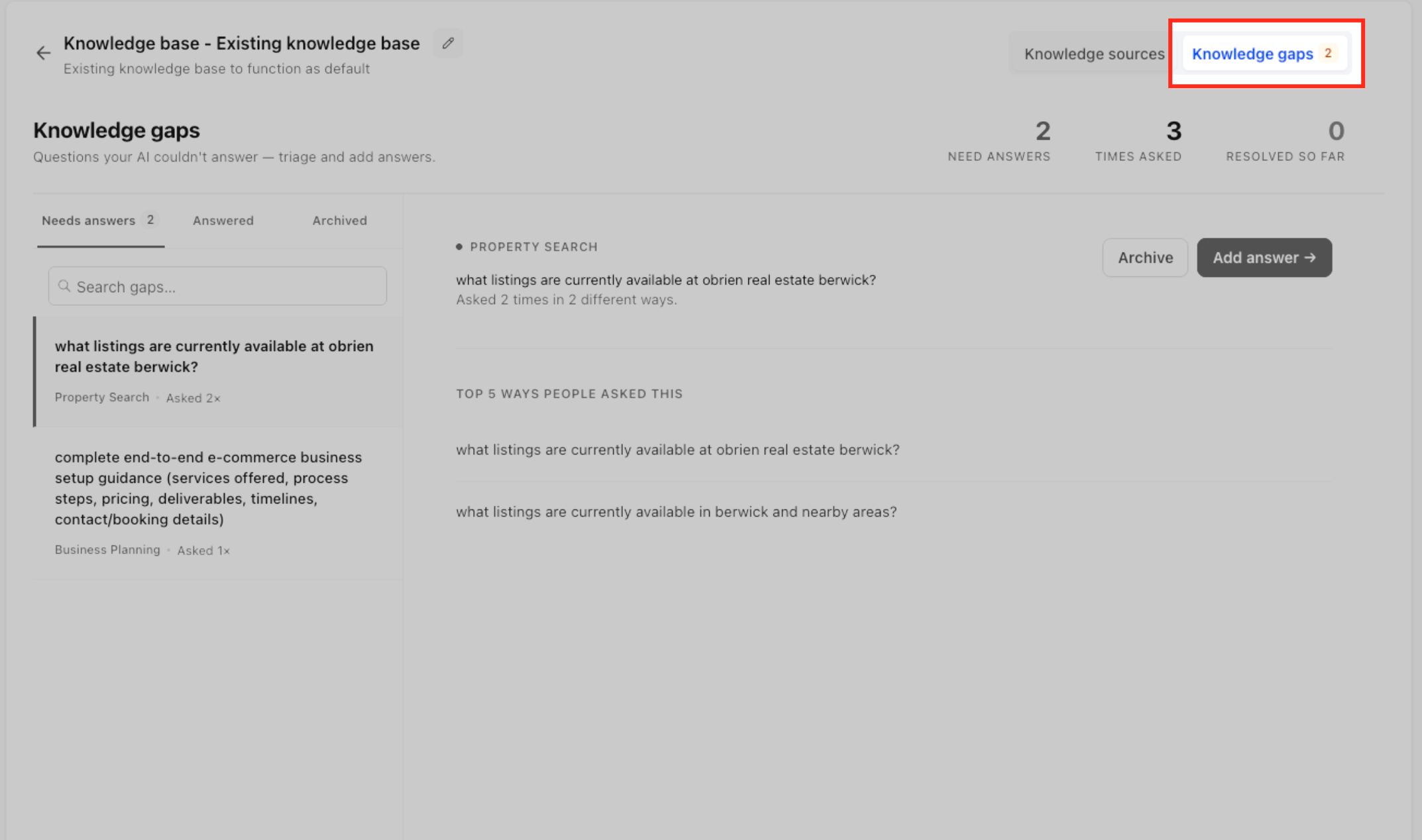
After the Voice AI agent handles caller questions, review the Knowledge Gaps page to identify questions the agent could not answer.
Use the available topic, subtopic, and grouped-question information to understand the underlying knowledge need rather than treating every phrasing variation as a separate problem.
Prioritize gaps that represent important or frequently recurring caller needs.
Step 5: Add the Missing Information
Review the unanswered question or grouped questions.
Determine what accurate information the Voice AI agent needs.
Open the Knowledge Base connected to the agent.
Add or update the appropriate source content.
Keep the answer clear, current, and specific enough for the agent to retrieve.
Save or process the updated source as required.
Knowledge Bases can be managed from AI Agents → Knowledge Base, where supported source types can be added or edited.
Step 6: Validate the Updated Answer
Test the updated Knowledge Base with the question that originally exposed the gap.
Try additional ways a caller might phrase the same request.
Confirm the correct information is retrieved.
Test the Voice AI agent again to verify the response in a conversation.
Continue reviewing new Knowledge Gaps as callers introduce new questions.
Regular testing helps confirm that updated knowledge produces the intended response and that the agent does not guess when required information is unavailable.
How to Fix a Knowledge Gap
Once you identify something your Voice AI doesn't know, the next step is to update the Knowledge Base connected to your agent.
Depending on the type of information you're adding, your Knowledge Base can include sources such as:
FAQs — Great for common customer questions and straightforward answers.
Rich Text — Useful for detailed information about your business, policies, services, or processes.
Website Content — Use the Web Crawler to bring relevant information from your website into the Knowledge Base.
Tables — Helpful for structured information such as pricing, locations, service details, or other organized data.
Uploaded Files — Add relevant business documents containing information your AI may need.
The clearer and more accurate your Knowledge Base is, the better equipped your Voice AI agent will be to answer callers.
Test Your Voice AI After Making Changes
After filling a Knowledge Gap, test your Voice AI agent again.
Try asking the original question, but don't stop there.
Ask the same question in a few different ways.
For example:
"What time do you close?"
"How late are you open?"
"What are your business hours today?"
This helps make sure your AI can find and communicate the correct information even when customers phrase their questions differently.
Turn Real Calls Into Better AI Conversations
You don't have to build the perfect Knowledge Base on day one.
Your customers can actually help show you what information is missing.
By regularly reviewing Knowledge Gaps and updating your Knowledge Base, you can create a simple improvement cycle:
Review → Update → Test → Improve
Over time, your Voice AI becomes better equipped to answer the questions that matter most to your customers.
That can mean fewer unanswered questions, more helpful conversations, and a better experience for every caller.
The Bottom Line
Your Voice AI shouldn't be something you set up once and forget about.
Knowledge Gaps give you a clear way to continuously improve it.
By paying attention to what your AI doesn't know today, you can help it provide better answers tomorrow — and create a Voice AI experience that's increasingly tailored to your business and your customers.
